
Marin County court case search provides a structured way to review legal case details filed within local courts. Users can review civil, criminal, and traffic case records through official online systems and clerk-maintained databases. Case numbers, hearing dates, filing status, and party details are commonly included within search results. This process helps attorneys, researchers, and the public verify court activity without delays. Updated records from the county court system support accurate case tracking across multiple divisions on a regular basis.
Marin County court case search system supports public review of filed cases across multiple legal divisions through official county resources. The database includes criminal matters, civil disputes, probate files, and family-related proceedings stored in structured records. Users can view docket entries, hearing schedules, and case status updates maintained by Marin County Superior Court. Search results may include party names, filing dates, and related court documents for reference across jurisdictions. Records are updated regularly to reflect new filings and case activity within the county court system.
How to Search Marin County Court Cases Online
Marin County court cases can be searched online through the official ePortal system provided by the Superior Court. The platform allows users to view public case details such as party names, case numbers, hearing dates, and case status. The system works as a digital court case search tool where users can run name-based or case number searches through Marin County Court and view available public records in real time.
Open the Official ePortal Page
Users begin by opening the official Marin County public portal:
- Visit the link: https://webportal.marin.courts.ca.gov/publicportal/?q=node/393
- Wait for the ePortal landing page to load
- This page is the entry point for all online court searches
The system is managed by Marin County Superior Court and connects directly to court case records.
Enter the ePortal System
After opening the page:
- Look for the “ePortal” access area
- Click the button or link that says Public Access / Case Search
- Some users may need to create an account before continuing
The system may request a login because full case search features require authentication.
Select Case Search Option
Inside the portal dashboard, users will see multiple tools:
Available search tools:
- Name Search (most common)
- Case Number Search
- Calendar Search
- Filing / Public Reports Search
The name search tool is used for general public lookup, while the case number search gives exact results.
Enter Search Details
Users can input different types of information:
- Full or partial party name
- Case number (if known)
- Date range (optional filter)
The system pulls data from the court’s electronic records database and matches it with entered details.
Review Case Results
After submitting the search, the results will display on the screen.
Each result may include:
- Case number and type (civil, criminal, family, traffic)
- Party names linked to the case
- Filing date and court location
- Case status (open, closed, pending)
- Hearing dates and updates
Users can click any case for deeper details.
Open Full Case Information
Inside the selected case, users may view:
- Register of actions (case timeline)
- Filed documents summary
- Court hearing history
- Assigned department or judge
- Status updates from the court system
This electronic record system updates as new filings are added.
Search Limits and Rules
The portal has certain restrictions:
- Some records are confidential or sealed
- Juvenile and sensitive cases are not fully visible
- Daily search limits may apply for public users
Users should also note that updates may appear with slight delays after filing.
Quick User Flow Summary
- Open the official ePortal link
- Enter the public access section
- Choose search type (name or case number)
- Enter details and submit
- View results and open case record
- Check case status, hearings, and filings
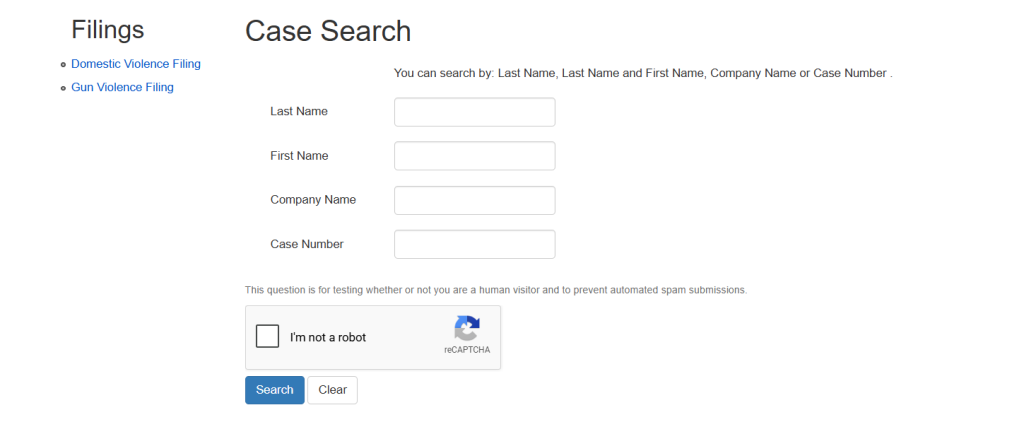
Search by Name in Marin County Court Records
A name-based search helps users find court cases by entering a person’s name into the Marin County Superior Court case lookup system. This type of Marin County case lookup is useful for finding civil, criminal, probate, family, and traffic court records connected to a defendant, plaintiff, or other party listed in a case. Name searches work best when users enter accurate spelling details and narrow the results with extra information, such as filing year or case type. Small changes in spelling often produce very different results, so careful entry improves court case lookup accuracy.
How Search by Name Works in Marin County Case Lookup
The online court case lookup system allows users to search records using a party name search instead of a case number. This method is commonly used when the exact case number is unknown.
Users can search by:
- Defendant name
- Plaintiff name
- Litigant lookup
- Business or organization name
- Attorney’s name in some records
Many public users rely on identity-based search methods when checking court activity, pending hearings, or filing history connected to a person.
Steps for Performing a Defendant Search
A proper search by name improves result quality and reduces duplicate matches. Most public court portals follow a similar process.
Basic Search Process
- Open the official Marin County court case lookup portal
- Select the search by name option
- Enter the first and last name carefully
- Choose a court division if available
- Review the list of matching cases
- Open the case record for more details
Some records may display:
| Information Displayed | Possible Details |
|---|---|
| Case Number | Unique court file number |
| Party Names | Plaintiff and defendant names |
| Filing Date | Date case entered court |
| Court Division | Criminal, civil, probate, family |
| Hearing Information | Upcoming court appearances |
| Case Status | Open, closed, dismissed |
This process helps users complete a Marin County case lookup without needing courthouse paperwork.
Common Problems During Party Name Search
Name-based searches often return multiple results. This happens when several people share the same first and last name.
Common search issues include:
- Misspelled names
- Missing middle initials
- Hyphenated surnames
- Nicknames instead of legal names
- Similar spelling variations
- Large result lists for common names
For example, a search for “John Smith” may return many unrelated records. A more specific litigant lookup produces better matches. Some court systems limit public visibility for sealed or confidential records. Juvenile matters, sensitive family cases, and protected filings may not appear in public search results.
Search by Case Number in Marin Court System
A search by case number is one of the most accurate ways to find court records in the Marin County Superior Court online system. This method uses a unique record identifier assigned to each case, helping users locate exact case information without reviewing multiple name-based matches.
Why Case Number Search Is More Accurate
A Marin County court case search using a case number usually produces a direct match linked to a single court file. Court systems assign a unique Court Docket and docket number search identifier when a case is filed, making this method faster and more reliable than broad party name searches. Users can quickly review hearings, filing dates, case status, and related court activity without sorting through unrelated records. Case ID tracking reduces confusion caused by common names, spelling variations, or duplicate litigant entries appearing in public court databases.
- Produces faster search results
- Reduces duplicate record matches
- Improves accuracy for court case lookup
- Helps locate exact filing information
- Works well for active and closed cases
What a Marin County Case Number Looks Like
Each court case receives a unique record identifier that helps organize filings within the court system. A case number may contain letters, numbers, filing year details, or court division codes connected to criminal, civil, probate, family, or traffic matters. Users often receive the case number from court paperwork, hearing notices, legal filings, attorney documents, or clerk records. The format may vary depending on the division handling the case. Correct entry is important since even one incorrect digit may prevent successful case ID tracking results.
| Court Division | Example Format |
|---|---|
| Criminal Court | SC123456A |
| Civil Court | CIV2101234 |
| Family Court | FL2205678 |
| Probate Court | PR2100456 |
| Traffic Court | TR2309876 |
How to Locate a Court Case Number
Users can locate a case number through several official court-related sources connected to the filing. Many court notices display the docket number search identifier near the top of the document for quick reference. Attorneys, law enforcement paperwork, citation notices, and prior court records may contain the same information. Some users first perform a search by name to identify the correct case number before conducting a more accurate Marin County court case search using the record identifier directly.
- Court summons or hearing notices
- Traffic tickets or citations
- Attorney paperwork
- Filed legal documents
- Previous court search results
- Clerk’s office records
Instructions for Search by Case Number
Users can complete a search by case number by entering the exact record identifier into the court case lookup portal. This method usually produces a direct result connected to the selected filing. Accurate entry is important since court systems rely on exact matching for case ID tracking and docket number search functions. Users should type the number carefully without adding extra spaces or symbols. Many court systems display case status, hearing dates, filed motions, and party details once the correct number is entered.
- Open the Marin County court case lookup portal
- Select the search by case number option
- Enter the complete case number carefully
- Review the displayed case information
- Open the record for hearings and filings
- Save or print details if needed
Common Errors During Docket Number Search
Small typing mistakes often prevent successful record searches within court databases. Missing letters, extra spaces, or incorrect number sequences may stop the system from locating the requested case information. Some users confuse older case numbers with updated filings connected to appeals or transferred matters. Court systems may use different formats for separate divisions, creating search problems when the wrong identifier type is entered. Double-checking the full record identifier improves accuracy and reduces failed Marin County court case search attempts.
- Entering incomplete case numbers
- Using outdated filing identifiers
- Typing extra spaces or punctuation
- Confusing civil and criminal formats
- Mixing letters and numbers incorrectly
Information Available After Case ID Tracking
Successful case ID tracking searches may display public court details connected to the selected filing. Many records show party names, hearing schedules, filing dates, motions, and current case status updates. Public users often review register of actions information to follow court activity connected to a specific record identifier. Some confidential filings remain restricted from online visibility under California court privacy rules. Sealed matters, juvenile records, and protected family filings may require courthouse review or judicial approval before inspection.
| Information Type | Details Available |
|---|---|
| Case Status | Open, pending, closed |
| Filing Date | Date case entered court |
| Hearing Dates | Scheduled court appearances |
| Court Division | Criminal, civil, probate |
| Party Information | Plaintiffs and defendants |
| Register of Actions | Court filing activity |
Register of Actions (Case History)
The register of actions is a court record summary that shows the timeline of activity connected to a case in the Marin County Superior Court system. This court case lookup feature helps users review filing history, hearing records, motions, judicial activity log updates, and important case events from the beginning of the case through its current status.
What the Register of Actions Shows
A register of actions works like a court timeline that tracks activity recorded by the clerk during the life of a case. Many users review this section to monitor hearings, filed documents, court rulings, continuances, and scheduled appearances. The judicial activity log updates each time a new filing, order, or hearing event enters the court system. Public case information may vary depending on court division and privacy restrictions connected to the filing. Criminal, civil, family, probate, and traffic cases often contain different levels of searchable filing history details.
- Filing dates and court events
- Hearing schedules and courtroom updates
- Motions, orders, and rulings
- Party and attorney activity
- Status changes during the case
Why Register of Actions Records Matter
Many public users rely on the register of action records to follow court progress without visiting the courthouse. The filing history helps attorneys, journalists, researchers, and case parties review important activity connected to ongoing litigation. Hearing records provide details about scheduled appearances, continuances, and judicial decisions entered into the court system. A detailed court timeline makes it easier to track changes between hearings and filings. Court case lookup systems often display this information in chronological order, helping users review the sequence of legal activity more clearly.
- Tracks ongoing case progress
- Displays scheduled hearing updates
- Shows filing and motion activity
- Helps confirm court actions
- Improves public case review
Information Commonly Found in Filing History
The filing history section may contain many different court events connected to the case. Publicly searchable records often include filed motions, clerk entries, hearing dates, minute orders, judicial rulings, and procedural updates. Some records display document titles without allowing full document viewing. Criminal and civil divisions usually contain more detailed judicial activity log entries than restricted family or juvenile matters. The amount of case information visible online depends on court rules, privacy protections, and document availability within the Marin County court case lookup system.
| Filing History Entry | Possible Details |
|---|---|
| Motion Filed | Request submitted to court |
| Hearing Scheduled | Court appearance date |
| Minute Order | Judge’s procedural ruling |
| Continuance | Hearing postponed |
| Judgment Entered | Final court decision |
| Case Closed | Matter officially completed |
How to Read a Court Timeline
A court timeline usually lists entries from oldest to newest or newest to oldest depending on the portal settings. Each event includes a filing date and a short description explaining the recorded activity. Users reviewing hearing records should pay attention to status updates, scheduled appearances, and judge-issued orders connected to the case. Some filings may contain abbreviations commonly used by court clerks and attorneys. Reading the entries carefully helps users understand how the case progressed through hearings, motions, and court decisions over time.
- Review dates in chronological order
- Watch for hearing changes or continuances
- Check status updates after hearings
- Look for judgments or dismissal entries
- Compare filings with hearing activity
Limits on Public Judicial Activity Log Records
Some court records remain unavailable through public court case lookup systems due to California privacy laws and court protection rules. Juvenile matters, sealed filings, mental health proceedings, and certain family court records may contain restricted hearing records or hidden filing history entries. Public users may see limited docket information without document details in sensitive cases. The register of actions may remove confidential addresses, protected names, or private attachments from public visibility. Courthouse review or judicial approval may be required for restricted case inspection requests.
- Juvenile records may stay confidential
- Sealed filings may not appear online
- Protected personal details can be hidden
- Some family records show limited entries
- Court approval may be required for restricted files
Court Hearings & Updates
Case status records help users track the current stage of a court matter through the Marin County Superior Court online system. Public court case lookup tools often display hearing search details, judicial scheduling updates, filing activity, and status changes connected to criminal, civil, probate, family, or traffic cases.
Court Hearing Dates
Court hearing dates show when parties must appear before a judge for legal proceedings connected to the case. Judicial scheduling may include arraignments, motions, settlement conferences, status reviews, trials, or sentencing hearings, depending on the case type. Hearing search records usually display the courtroom, department number, hearing time, and scheduled date. Some hearings may change because of continuances, judicial calendar adjustments, or procedural delays. Users should review court hearing dates regularly since scheduling updates may appear after new filings or court orders.
| Hearing Type | Purpose |
|---|---|
| Arraignment | Initial criminal court appearance |
| Motion Hearing | Review legal requests |
| Status Conference | Case progress review |
| Trial Date | Formal court proceeding |
| Sentencing Hearing | Criminal penalty decision |
| Probate Hearing | Estate-related court review |
Common Case Status Terms Explained
Court systems use status labels to show the progress of a case within the judicial process. Many users reviewing case information may not understand what each status update means during a court case lookup search. Pending cases usually remain active with future hearings or unresolved legal matters. Closed cases indicate the court completed the proceeding through dismissal, settlement, judgment, or sentencing. Some systems display temporary updates during judicial scheduling changes, filing reviews, or clerk processing periods connected to hearing search activity.
- Pending — Case remains active
- Closed — Court completed the matter
- Dismissed — Court removed the case
- Continued — Hearing moved to another date
- Judgment Entered — Final decision recorded
- Under Review — Court reviewing filings or motions
Why Hearing Search Records Change
Court hearing schedules may change several times during the life of a case. Judges, attorneys, clerks, or procedural filings can affect judicial scheduling and create updated hearing records within the system. Continuances often occur when parties request more preparation time or when court calendars become overloaded. Weather conditions, attorney conflicts, or missing documents may affect hearing dates in some situations. Users checking case status should review court hearing dates frequently to avoid relying on outdated scheduling information shown in older court records.
- Hearings may be postponed or rescheduled
- Court calendars can change daily
- New filings may create updated hearing dates
- Judicial orders may affect scheduling
- Emergency closures can delay proceedings
What Users Can Expect From Status Updates
Case information systems often display recent court activity connected to hearings, motions, and filing events. Public users may view updated hearing search records, filing dates, judicial actions, and current case progress within the online portal. Some status updates appear immediately after hearings, while others require clerk review before publication. Criminal, civil, probate, traffic, and family divisions may display different levels of public information depending on California court privacy rules. Restricted or sealed matters may contain limited status visibility within the public case lookup system.
| Status Update | Meaning |
|---|---|
| Active | Case currently moving through court |
| Awaiting Hearing | Future hearing already scheduled |
| Closed | Court process completed |
| Reopened | Previously closed case resumed |
| On Calendar | Scheduled for court appearance |
| Vacated | Hearing or order canceled |
Public Access Rules for Court Case Information
Public case lookup systems allow users to review many court records through the Marin County Superior Court online portal. California transparency laws support public inspection of many court filings, though legal privacy rules limit visibility for sealed cases, confidential records, and protected court information.
How Public Case Lookup Systems Work
Online case access systems help users review court records without visiting the courthouse in person. Public users can search many criminal, civil, probate, traffic, and limited family court matters through searchable databases maintained by the court system. These systems display case information such as filing dates, hearing schedules, party names, and court status updates. Public case lookup tools improve transparency by allowing citizens, attorneys, journalists, and researchers to monitor judicial activity. Some records display only summary information instead of complete court documents.
- Searchable court case information
- Hearing schedules and filing dates
- Case status and judicial activity
- Register of actions summaries
- Limited document viewing in some cases
California Transparency Laws and Court Records
California transparency laws support public inspection of many judicial records created during court proceedings. Courts maintain public court records to support accountability within the legal system and allow citizens to review judicial activity. Criminal, civil, traffic, and probate matters often remain publicly searchable unless restricted by statute or court order. Legal privacy rules still protect sensitive personal information connected to protected filings. Courts may remove financial details, addresses, birth dates, or confidential identifiers from online case access systems before publication.
| Publicly Available Records | Restricted Court Records |
|---|---|
| Criminal case summaries | Juvenile court matters |
| Civil court filings | Sealed court cases |
| Traffic violations | Mental health proceedings |
| Probate filings | Adoption records |
| Hearing schedules | Protected family records |
What Restricted Records Mean
Restricted records are court files hidden from standard public case lookup systems because of legal privacy protections or judicial orders. Courts often limit visibility for sealed cases involving minors, confidential medical information, domestic violence protection, or sensitive family matters. Some restricted records display only basic case information without detailed filings or hearing records. In certain situations, the entire case may remain unavailable within online case access systems. Court clerks and judges decide record visibility based on California laws and court-specific confidentiality requirements.
- Juvenile filings usually remain confidential
- Sealed cases may not appear online
- Family law records may contain limited details
- Protected personal information can be removed
- Judicial orders may block public inspection
How Sealed Cases Affect Online Case Access
A sealed case is a court matter removed from normal public visibility through a judicial order. Courts may seal records to protect victims, minors, confidential evidence, or ongoing investigations connected to the proceeding. Public users searching court records may receive limited results or no searchable entry for these matters. Some sealed cases display only a case number or minimal filing details without documents or hearing information. Legal privacy rules prevent unrestricted inspection of sealed filings through standard online case access systems.
- Sealed records remain hidden from public search
- Sensitive filings receive extra court protection
- Some cases show only limited case details
- Court approval may be needed for inspection
- Confidential documents stay unavailable online
Limits of Public Court Records
Public case lookup systems do not always display every document connected to a case. Some courts publish only summary details instead of full filings, scanned records, or evidence attachments. Hearing updates and judicial scheduling information may appear faster than uploaded documents within the court records database. Technical delays, privacy restrictions, and clerk review procedures can affect online case access timing. Users searching court records should understand that courthouse files may contain more information than what appears in the public online portal.
- Some filings remain unavailable online
- Document uploads may appear later than hearings
- Clerk review can delay public updates
- Privacy laws restrict sensitive information
- Courthouse files may contain expanded records
Why Legal Privacy Rules Matter
Legal privacy rules help balance public transparency with personal privacy protections inside the court system. Courts must protect confidential information connected to minors, victims, medical matters, financial records, and protected witnesses. Public access laws support open judicial records, though privacy statutes limit unrestricted publication of sensitive material. Courts regularly review filings before online publication to remove protected details from searchable databases. These protections help maintain fairness within public court records systems while reducing risks connected to identity misuse or confidential information exposure.
- Protects confidential personal information
- Limits the exposure of sensitive court filings
- Supports fair public transparency standards
- Reduces misuse of protected records
- Maintains privacy within online court systems
Frequently Asked Questions
Many users searching the Marin County court case search records have questions about online court case lookup tools, hearing records, filing history, and public case information availability. The answers below explain how online searches work, what users can expect from public court databases, and how California online access rules affect searchable court records. These FAQs help users understand name search process methods, case number lookup options, register of actions records, and hearing schedule visibility within the Marin County court system.
How do I search Marin County court cases online?
Users can complete a Marin County court case search through the Marin County Superior Court online portal using either a case number or party name. The court case lookup system may display filing dates, hearing schedules, register of actions entries, judicial activity, and current case status information. Criminal, civil, probate, family, and traffic matters often appear within the searchable database, depending on public visibility rules. Accurate spelling and correct case details usually improve search results and reduce unrelated matches during online searches.
Can I search court cases by name?
Yes, many public users perform a name search process when the exact case number is unavailable. The online court case lookup system allows searches using a defendant’s name, plaintiff’s name, litigant information, or business name connected to the filing. Users should enter full legal names carefully since common names may produce multiple results. Some databases support filtering by filing year or court division to improve search accuracy. Restricted records and sealed cases may remain unavailable during public name-based searches.
How do I find a case number in Marin County?
A case number lookup can often be completed using court notices, hearing paperwork, attorney filings, citations, or prior court documents connected to the case. Many users first complete a search by name to locate the correct record identifier before performing a direct case search. Court case numbers usually contain letters and numbers connected to the filing year and court division. Accurate entry is important since even one incorrect digit may prevent successful search results within the online case information system.
What is a register of actions?
A register of actions is a court timeline showing filing history, hearing records, judicial scheduling updates, and procedural activity connected to a case. This section of the court case lookup system helps users review motions, continuances, court rulings, clerk entries, and hearing dates in chronological order. Many public users rely on the register of actions to monitor case progress without visiting the courthouse. Some sensitive filings may remain hidden because of legal privacy rules or restricted court record protections.
Are all court cases public in Marin County?
No, some court records remain restricted under California legal privacy rules and judicial confidentiality protections. Public case lookup systems commonly display criminal, civil, probate, and traffic matters, though juvenile records, sealed cases, adoption proceedings, and certain family court filings may remain unavailable online. Courts sometimes remove confidential information from searchable databases before publication. Public visibility depends on court rules, filing type, judicial orders, and privacy laws connected to the specific case.